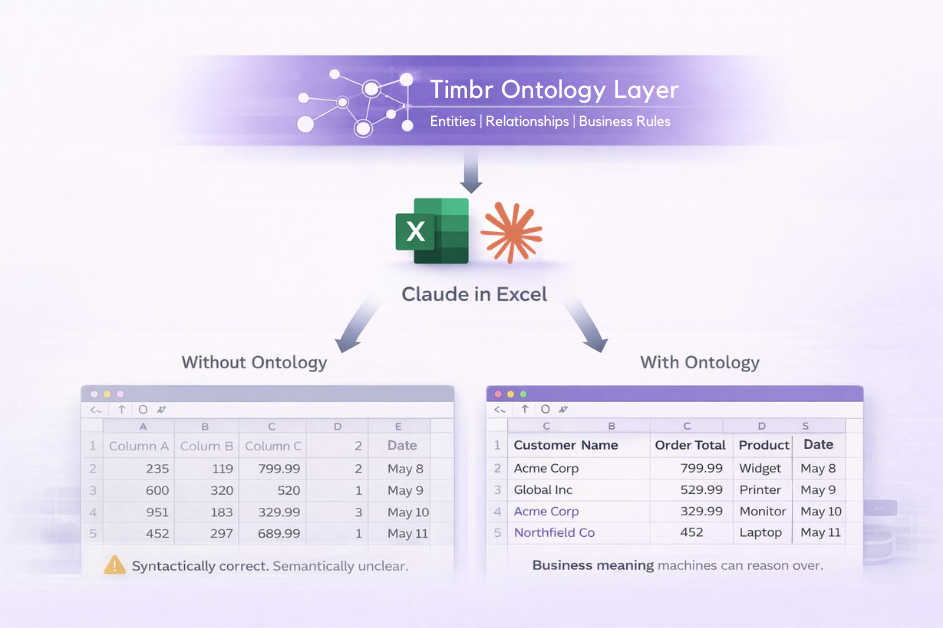
Every analyst knows the feeling. You export a clean-looking dataset, open it in Excel, and within minutes you’re back on Slack asking someone what a column actually means, or why two regions report the same metric differently. The data looks right. It just doesn’t mean anything on its own.
Claude in Excel promises to change how analysts work, and in many ways it delivers. It can explain formulas, fix broken models, build pivot tables, and reason across complex multi-tab workbooks with a level of fluency that genuinely impresses. But it can only work with what it receives. And what it typically receives is a spreadsheet that has already had most of its business meaning stripped out in transit.
This article examines that gap: what causes it, why the standard data architecture approaches don’t fully close it, and how an ontology-based semantic layer changes the equation. If you are evaluating AI tools for Excel, or thinking about what your data infrastructure needs to look like before AI in the workflow becomes genuinely reliable, this is the context that’s missing from most of the conversation.
Introduction
Claude in Excel is the kind of product people have been waiting for. Not because spreadsheets needed more features, but because Excel is where business decisions actually happen. When an AI assistant can explain formulas, fix broken models, build pivot tables, and sanity-check assumptions directly inside the file, that is real leverage for analysts and operators. No switching tabs. No copying outputs.
Just intelligence embedded in the workflow.
But there is a quiet constraint underneath all the excitement. Claude in Excel starts with your workbook as-is. And in most enterprises, the workbook is not the source of truth. It is a snapshot, exported from Snowflake or Databricks, reshaped by hand, stitched together across tabs, and often stripped of the business meaning that made the data trustworthy in the first place.
So the question is not whether Claude can analyze spreadsheets. It can, and very well. The question is whether it can understand your business when the spreadsheet does not.
The Data Problem Nobody's Talking About
In most organizations, far more time is spent preparing spreadsheets than analyzing them. By the time data reaches Excel, much of the context that made it meaningful has already been stripped away. Exports from data warehouses often look clean at first glance: column headers are tidy, numbers add up. But the moment a follow-up question surfaces, “why two regions report revenue differently, or how a metric should be interpreted across teams”, the process stalls. Analysts circle back to documentation, message the data team, or wait for clarification from someone who was there when the logic was built.
The data exists somewhere, in Snowflake, Databricks, ClickHouse, or a data lake. But the journey from source to spreadsheet quietly strips away the context that makes data trustworthy. Relationships get flattened. Business rules disappear. Definitions that were never formally encoded do not survive the export. When an AI agent lands in that spreadsheet, it inherits all of this missing context. It sees numbers. It does not see meaning.
Why the Gold Layer Still Isn't Enough
Many enterprises have already invested heavily in solving this problem. They have built what data architects call a Gold Layer, a curated and governed set of tables designed to represent clean, trusted, business-ready data. The Gold Layer is genuinely valuable. It is what makes BI work. But it was designed for humans.
Gold works for a person who knows which table to use, how to interpret the results, and when a definition requires additional context. It works because humans fill in the gaps with experience and institutional knowledge. Consider a common example: a customer who is also a strategic partner. In a Gold Layer, both roles may exist in the same table, but nothing tells a downstream agent how that dual relationship should affect revenue attribution, pipeline forecasting, or support prioritization. A human analyst knows because they have context that an AI agent simply does not inherit. Gold answers questions. It does not explain the business.
What AI Agents Actually Need: The Diamond Layer
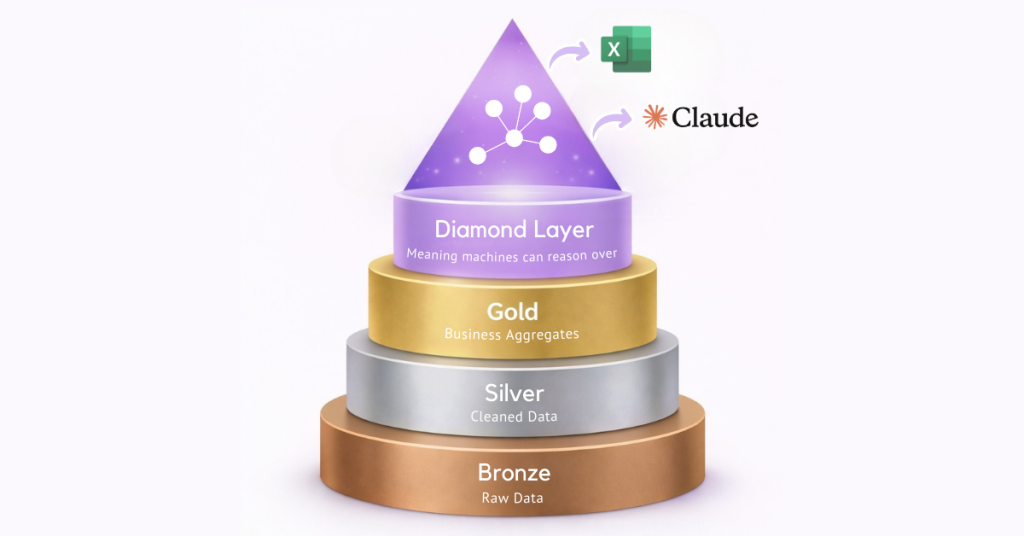
A clearer framework is emerging for thinking about this gap. The Medallion Architecture, Bronze, Silver, and Gold, has served enterprises well. Raw data is cleaned, refined, and curated into a trusted foundation. But as AI agents take on more analytical work, a gap opens above Gold. That gap is the Diamond Layer.
The Diamond Layer is not about cleaner data. It is about meaning that machines can reason over. It is defined by a single constraint: enable machines to reason about data relationships and business rules without human interpretation. That requires typed entities, explicit relationships, inheritance, role-based meaning, and business rules treated as first-class logic, not buried in custom SQL or documentation that no agent will ever read.
The difference is subtle but critical. A Gold Layer can state that a customer generated a certain amount of revenue. A Diamond Layer allows an AI agent to understand how that revenue should be interpreted, based on roles, relationships, and business rules, even when everything lives in the same underlying table. No new views. No duplicated pipelines. No human rewriting logic every time a question changes.
Views flatten meaning for performance. Ontologies preserve meaning for reasoning.
From Concept to Practice: Timbr as the Diamond Layer
The original thesis raised a fair challenge: building an ontology layer is hard, expensive, and slow, and recommending it as a prerequisite for reliable AI in Excel is theoretically correct but not a practical roadmap for most organizations. That challenge changes significantly when the semantic layer is deployed for broader reasons first, with Excel as one of many downstream consumers rather than the justification for the investment.
Timbr is an ontology-based SQL semantic layer that models business concepts, relationships, and rules at the data layer and exposes them consistently across tools, BI platforms, AI agents, LangChain pipelines, GraphRAG applications, and Excel. When an enterprise deploys Timbr for its AI and data infrastructure broadly, the Diamond Layer is already in place. Excel simply becomes another governed consumer of it.
How Timbr Addresses the Core Problems
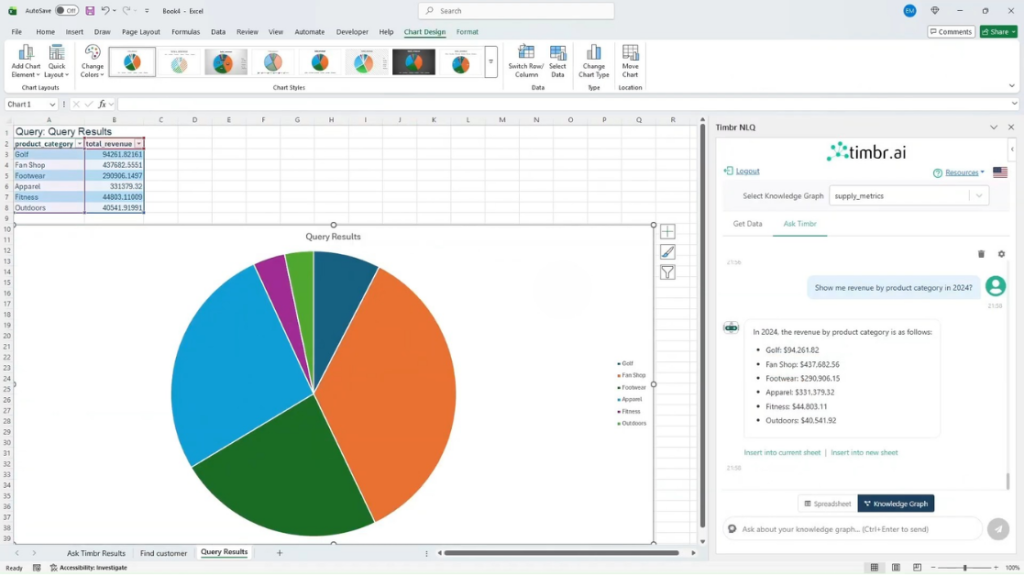
Timbr’s Guided Natural Language add-in for Excel changes the data retrieval flow entirely. Rather than an analyst exporting a stripped snapshot from Snowflake or Databricks and handing it to Claude, the Timbr add-in allows users to type a natural language question directly in Excel, “Show me Q3 revenue by region for enterprise customers”, and Timbr translates it into optimized SQL executed against the ontology, returning governed, semantically-correct data directly into the spreadsheet. The data that lands in Excel already carries business meaning because it came through the ontology layer, not around it.
Critically, all queries respect the definitions, relationships, and access controls embedded in the Timbr ontology. Row-level security and data masking are enforced automatically. KPI definitions are consistent across teams. The customer-who-is-also-a-partner problem is handled at the semantic layer, not left to the analyst, or the AI, to resolve.
Two Tools, Complementary Roles
Claude in Excel and Timbr’s Excel add-in are not competing products. They address different stages of the spreadsheet workflow and are more powerful in combination than either is alone.
Timbr handles the data retrieval problem: getting the right, governed, semantically-grounded data into the spreadsheet in the first place. Claude in Excel handles the analysis and modeling problem: explaining formulas, building financial models, fixing errors, updating assumptions, and running scenarios on the data that is already in the workbook. Used together, the workflow looks like this: an analyst uses the Timbr add-in to pull live, governed data from the enterprise data platform; Claude in
Excel then helps them build the model, run scenarios, and explain the results, all without leaving Excel, all grounded in data that reflects how the business actually operates.
This combination is meaningfully closer to reliable AI in spreadsheets than Claude in Excel alone, and it reflects a more realistic adoption path. The ontology work is justified by the broader infrastructure ROI, serving AI agents, BI tools, LangChain applications, and more, while Excel benefits without carrying the justification burden on its own.
The Problem That Remains: Analysis That Disappears
There is a second limitation of AI assistants inside spreadsheets that receives far less attention, and that neither Claude in Excel nor Timbr currently solves.
When analysis exists only inside an AI session, it disappears when the session ends. Claude in Excel does not persist reasoning between sessions, each time the add-in is opened, the conversation starts fresh. Formula explanations, dependency analyses, scenario walkthroughs: none of it accumulates. For individual productivity, this may be acceptable. For enterprise workflows, it is a structural problem.
When business meaning lives inside individual sessions, organizations never build shared intelligence. Every analyst starts from scratch. Every agent relearns the same definitions. Progress does not compound. The reasoning that happens today does not make the analysis tomorrow any faster. Timbr’s ontology layer governs the data foundation persistently, but the analytical reasoning layer, the interpretations, model decisions, and scenario logic that analysts develop with Claude, still vanishes at session end.
Solving this fully would require a mechanism for capturing and reusing AI reasoning across sessions, something neither tool currently provides, but which represents a clear direction for the next generation of enterprise AI-in-spreadsheets tooling.
The Real Question
Claude in Excel is genuinely impressive. The analysis it can perform, the errors it can catch, and the models it can build are useful in practice. But the question worth asking before rolling it out broadly is not whether it can analyze spreadsheets. It is whether the data has enough meaning for the analysis to be right in the first place.
If definitions differ between teams, if business rules live in custom SQL that no agent can access, and if every export strips away the context that makes data trustworthy, the problem is not AI. It is the data foundation. The Diamond Layer is what changes that, and Timbr is a concrete, production-ready implementation of it.
Importantly, the most practical path to this foundation is not building an ontology layer for Excel. It is building an ontology layer for your data infrastructure, to serve AI agents, BI platforms, and analytical pipelines, and letting Excel become one well-served consumer among many. Once that foundation is in place, tools like Claude in Excel stop being impressive demos and start becoming something far more valuable: reliable.
The teams moving fastest with AI right now are not the ones with the smartest agents. They are the ones who did the foundation work first.
If you’re evaluating Claude in Excel, the real question is not how powerful the assistant is. It’s whether your data is structured in a way an assistant can actually reason over. Ontologies are what make that possible, and when they’re implemented at the data layer, Excel stops being a semantic dead end and becomes a governed, reliable consumer of enterprise meaning.
That is the role the Diamond Layer plays. And it’s the role Timbr is designed to fill.
Learn how Timbr brings ontology-based semantics into Excel